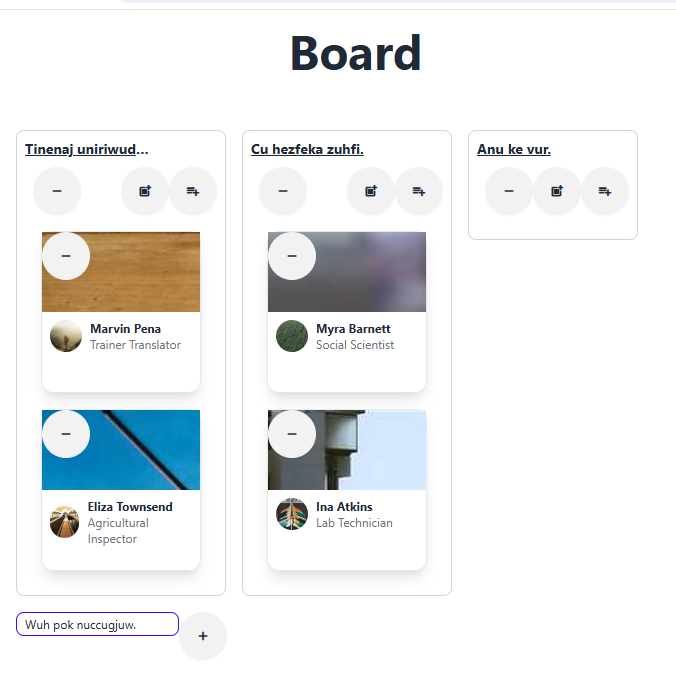
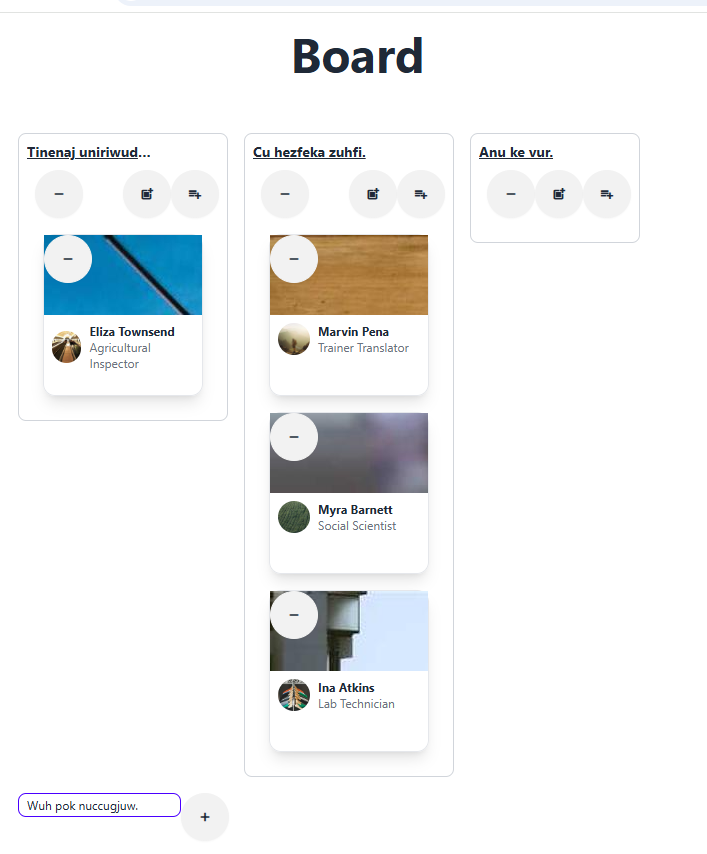
트렐로 따라 만들기 [ 2 ]
react-dnd의 useDrop 훅 알아보기
이제 react-dnd 패키지의 기능으로 보드에서 목록을 드래그 앤 드롭으로 옮기는 기능을 구현하겠습니다.
react-dnd 패키지에서는 useDrop훅을 제공합니다
useDrop 훅 임포트
import {useDrop} from 'react-dnd'
useDrop훅의 사용법은 튜플 타입 반환값에서 두 번째 멤버인 drop 함수를 얻는 것입니다.
여기서accept는 드래그 앤 드롭 대상을 구분하는 용도로 사용할 문자열입니다.
useDrop 훅 기본 사용법
const [, drop] = useDrop(() => ({
accept: 'card'
}))
그리고 이 drop 함수를 드롭을 원하는HTML 요소의 ref에 설정해 줍니다.
<div ref={(node) => drop(node)} />
또는 다음처럼 drop함수를 호출하는 방식으로 구현할수도 있습니다.
const divRef = useRef<HTMLDivElement>(null)
drop(divRef)
주요 속성
accept : 드롭 가능한 아이템의 타입을 정의합니다. 문자열 또는 문자열 배열로 설정할 수 있습니다.
drop : 드롭 이벤트가 발생했을 때 실행되는 콜백 함수입니다. 드롭된 아이템과 드롭 모니터를 인자로 받습니다. collect : 드롭 영역의 상태를 수집하여 UI에 반영하는 함수입니다. 드롭 모니터를 인자로 받아, 드롭 영역의 상태를 반환합니다.
추가 속성
canDrop : 드롭 가능한지 여부를 결정하는 함수입니다. 이 함수는 드롭된 아이템의 타입과 드롭 영역의 상태를 기반으로 true 또는 false를 반환합니다. 이를 통해 드롭 가능 여부에 따라 UI를 조정할 수 있습니다.
hover: 드래그된 아이템이 드롭 영역 위에 있을 때 호출되는 콜백 함수입니다. 이 함수는 드래그된 아이템과 드롭된 영역의 상태를 업데이트하는 데 유용합니다.
options: 드롭 영역의 동작을 제어하는 추가적인 옵션을 설정할 수 있습니다. 예를 들어, dropEffect를 설정하여 드롭 효과를 지정할 수 있습니다.
drop collect 속성
isOver : 드래그된 아이템이 드롭 영역 위에 있는지를 나타냅니다. monitor.isOver() 메서드를 호출하면, 현재 드래그된 아이템이 드롭 영역 위에 있는 경우 true를 반환하고, 그렇지 않으면 false를 반환합니다.
canDrop: 드롭 가능한지 여부를 나타냅니다. monitor.canDrop() 메서드를 호출하면, 현재 드래그된 아이템이 드롭 영역에 드롭될 수 있는 경우 true를 반환하고, 그렇지 않으면 false를 반환합니다. 이 값은 드롭 영역이 특정 타입의 아이템을 수용할 수 있는지를 판단하는 데 사용됩니다.
react-dnd의 useDrag 훅 알아보기
react-dnd는 useDrag훅도 제공합니다.
import {useDrag} from 'react-dnd'
그런데 드래그 앤 드롭 기능을 구현하려면 useDrog과useDrag훅을 함께 사용해야 합니다.
샘플코드
const [{ isDragging }, darg ] = useDrag({
type: 'card'
item: () => {
return { id, index }
},
collect: (monitor : any) => ({
isDragging: monitor.isDragging(), // 드래그 상태를 수집하는 함수입니다. 드래그 중이면 true아니면false
}),
})
const opacity = isDragging ? 0 : 1
drag(ref) // 이부분은 잘모르겠음 이걸안하고 밑에 ref={drag}해도되는거아닌가..?
return (
<div ref={ref} style={{ ...style, opacity }}> data-handler-id={handlerId}>
{text}
</div>
)
파란색 글씨부분 검색결과
두 방법 모두 드래그 기능을 적용할 수 있지만, ref={drag} 방식이 더 간결하고 일반적으로 사용됩니다. react-dnd에서는 ref에 드래그 함수를 직접 할당하는 것이 권장되는 패턴입니다. 따라서, drag(ref)를 사용하지 않고 ref={drag}로 작성해도 동일한 결과를 얻을 수 있습니다.
ListDraggable 컴포넌트 구현하기
앞서본 샘플코드를 바탕으로 ListDraggable 컴포넌트를 만들겠습니다.
src\components\ListDraggable.tsx
import type { FC } from "react";
import { useRef } from "react";
import type { DivProps } from "./Div";
import { useDrag, useDrop } from "react-dnd";
import type { Identifier } from 'dnd-core'

export type MoveFunc = (dragIndex: number, hoverIndex: number) => void

export type ListDraggableProps = DivProps & {
    id: any
    index: number
    onMove: MoveFunc
}

interface DragItem{
    index: number
    id: string
    type: string
}

export const ListDraggable: FC<ListDraggableProps> = ({
    id,
    index,
    onMove,
    style,
    className,
    ...props
}) => {
    const ref = useRef<HTMLDivElement>(null)
    const [{handlerId}, drop] = useDrop<DragItem, void, {handlerId: Identifier | null}>({
        accept: 'list',
        collect(monitor) {
            return {
                handlerId: monitor.getHandlerId() // 현재 드롭 영역의 핸들러 ID를 가져옵니다. 이 ID는 드래그 앤 드롭 시스템에서 각 드롭 영역을 고유하게 식별하는 데 사용됩니다.
            }
        },
        hover(item: DragItem) {    // hover 함수는 드래그된 아이템이 드롭 영역 위에 있을 때 호출됩니다.
            if (!ref.current) { // ref가 현재 DOM 요소를 참조하고 있지 않으면 함수를 종료합니다. 이는 드롭 영역이 유효한지 확인하는 단계입니다.
                return
            }

            const dragIndex = item.index //  드래그된 아이템의 인덱스를 가져옵니다.
            const hoverIndex = index // 현재 드롭 영역의 인덱스를 가져옵니다.

            if (dragIndex === hoverIndex) {
                return
            }
            onMove(dragIndex, hoverIndex) // 이 함수는 아이템의 위치를 업데이트하는 역할을 합니다.
            item.index = hoverIndex // 드래그된 아이템의 인덱스를 현재 드롭 영역의 인덱스로 업데이트합니다.
        }
    })

    const [{isDragging}, drag] = useDrag({
        type: 'list',
        item: () => {
            return {id, index}
        },
        collect: (monitor: any) => ({
            isDragging: monitor.isDragging()
        })
    })

    const opacity = isDragging ? 0 : 1
    drag(drop(ref))

    return (
        <div
            ref={ref}
            {...props}
            className={[className, 'cursor-move'].join(' ')}
            style={{...style, opacity}}
            data-handler-id={handlerId}
        />
    )
}
이제 ListDraggable을 BoardList/index.tsx에 반영해줍니다. ListDraggable이 요구하는 index와 onMoveList함수를 Board로부터 받기위해 2개의 속성을 추가로 설정하고있습니다.
import type {FC} from 'react'
import type {List} from '../../store/commonTypes'
import type { MoveFunc } from '../../components'

import {useMemo} from 'react'
import {Div} from '../../components'
import {Icon} from '../../theme/daisyui'
import { ListDraggable } from '../../components'
import ListCard from '../ListCard'
import {useCards} from '../../store/useCards'

export type BoardListProps = {
  list: List
  onRemoveList?: () => void
  index: number
  onMoveList: MoveFunc
}
const BoardList: FC<BoardListProps> = ({list, onRemoveList, index, onMoveList, ...props}) => {
  const {cards, onPrependCard, onAppendCard, onRemoveCard} = useCards(list.uuid)

  const children = useMemo(
    () =>
      cards.map((card, index) => (
        <ListCard key={card.uuid} card={card} onRemove={onRemoveCard(card.uuid)} />
      )),
    [cards, onRemoveCard]
  )
  return (
    <ListDraggable id={list.uuid} index={index} onMove={onMoveList}>
      <Div {...props} className="p-2 m-2 border border-gray-300 rounded-lg">
        <div className="flex justify-between mb-2">
          <p className="w-32 text-sm font-bold underline line-clamp-1">{list.title}</p>
        </div>
        <div className="flex justify-between ml-2">
          <Icon name="remove" className="btn-error btn-xs" onClick={onRemoveList} />
          <div className="flex">
            <Icon name="post_add" className="btn-success btn-xs" onClick={onPrependCard} />
            <Icon name="playlist_add" className="ml-2 btn-success btn-xs" onClick={onAppendCard} />
          </div>
        </div>
        <div className="flex flex-col p-2">{children}</div>
      </Div>
    </ListDraggable>
  )
}

export default BoardList
하지만 이렇게 반영을 하면 오류가 발생합니다. useLists커스텀훅에 DraggableList에 추가한 onMoveList속성을 적용시켜야 에러가 없어질것입니다.
src\store\useLists.ts
import { useCallback } from "react";
import { useDispatch, useSelector } from "react-redux";
import type { AppState } from "../store";
import type { List } from "../store/commonTypes";
import * as LO from '../store/listidOrders'
import * as L from '../store/listEntities';
import * as C from '../store/cardEntities';
import * as LC from '../store/listidCardidOrders';

export const useLists = () => {
    const dispatch = useDispatch()

    const lists = useSelector<AppState, List[]>(({listidOrders, listEntities}) =>
        listidOrders.map(uuid => listEntities[uuid])
    )

    const listidCardidOrders = useSelector<AppState, LC.State>(({listidCardidOrders}) => listidCardidOrders)

    const listidOrders = useSelector<AppState, LO.State>(({listidOrders}) => listidOrders)

    const onCreateList = useCallback(
        (uuid: string, title: string) => {
            const list = {uuid, title}
            dispatch(LO.addListidToOrders(uuid))
            dispatch(L.addList(list))
            dispatch(LC.setListidCardids({listid: list.uuid, cardids:[]}))
        },
        [dispatch]
    )

    const onRemoveList = useCallback(
        (listid: string) => () => {
            listidCardidOrders[listid].forEach(cardid => {
                dispatch(C.removeCard(cardid))
            })
            dispatch(LC.removeListid(listid))
            dispatch(L.removeList(listid))
            dispatch(LO.removeListidFromOrders(listid))
        },
        [dispatch, listidCardidOrders]
    )

    const onMoveList = useCallback(
        (dragIndex: number, hoverIndex: number) => {
            const newOrders = listidOrders.map((item, index) =>
                index === dragIndex
                    ? listidOrders[hoverIndex]
                    : index === hoverIndex
                    ? listidOrders[dragIndex]
                    : item
            )
        },
        [dispatch, listidOrders]
    )

    return {lists, onCreateList, onRemoveList, onMoveList}
}
src\pages\Board\index.tsx
import { useCallback, useMemo, useRef } from "react";
import { useDrop } from "react-dnd";
import { useSelector, useDispatch } from "react-redux";
import {Title} from '../../components'
import CreateListForm from "./CreateListForm";

import BoardList from "../BoardList";
// import type { AppState } from "../../store";
// import type { List } from '../../store/commonTypes'

// import * as LO from '../../store/listidOrders';
// import * as L from '../../store/listEntities';

import { useLists } from "../../store/useLists";

export default function Board() {
    const divRef = useRef<HTMLDivElement>(null);
    const [,drop] = useDrop({
        accept: 'list'
    })
    drop(divRef);

    const {lists, onRemoveList, onCreateList, onMoveList} = useLists()

    const children = useMemo(
        () =>
            lists.map((list, index) => (
                <BoardList key={list.uuid} list={list} onRemoveList={onRemoveList(list.uuid)} index={index} onMoveList={onMoveList} />
            )),
            [lists, onRemoveList, onMoveList]
    )
    return (
        <section className="mt-4">
            <Title>Board</Title>
            <div className="flex flex-wrap p-2 mt-4">
                {children}
                <CreateListForm onCreateList={onCreateList} />
            </div>
        </section>
    )
}
여기까지 수정을하면 이제 목록을 옮길수가있습니다.
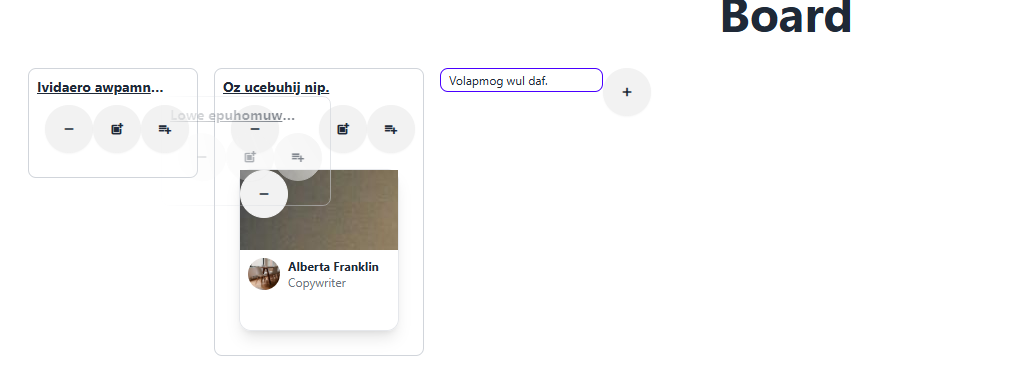
ListDraggable 컴포넌트 구현하기
코드들을 그대로 노출하는것은 좋지않어 ListDroppable이란 컴포넌트로 옮겨놓겠습니다.
src\components\ListDroppable.tsx
import type { FC } from "react";
import { useRef } from "react";
import type { DivProps } from "./Div";
import { useDrop } from "react-dnd";

export type ListDroppableProps = DivProps & {}

export const ListDroppable: FC<ListDroppableProps> = ({...props}) => {
    const divRef = useRef<HTMLDivElement>(null)
    const[, drop] = useDrop({
        accept: 'list'
    })
    drop(divRef)
    return <div ref={divRef} {...props}></div>
}
src\pages\Board\index.tsx
import { useCallback, useMemo, useRef } from "react";
import { useDrop } from "react-dnd";
import { useSelector, useDispatch } from "react-redux";
import {Title} from '../../components'
import CreateListForm from "./CreateListForm";

import BoardList from "../BoardList";
// import type { AppState } from "../../store";
// import type { List } from '../../store/commonTypes'

// import * as LO from '../../store/listidOrders';
// import * as L from '../../store/listEntities';

import { useLists } from "../../store/useLists";
import { ListDroppable } from "../../components";

export default function Board() {
    const {lists, onRemoveList, onCreateList, onMoveList} = useLists()

    const children = useMemo(
        () =>
            lists.map((list, index) => (
                <BoardList key={list.uuid} list={list} onRemoveList={onRemoveList(list.uuid)} index={index} onMoveList={onMoveList} />
            )),
            [lists, onRemoveList, onMoveList]
    )
    return (
        <section className="mt-4">
            <Title>Board</Title>
            <ListDroppable className="flex flex-row p-2 mt-4">
                <div className="flex flex-wrap p-2 mt-4">
                    {children}
                    <CreateListForm onCreateList={onCreateList} />
                </div>
            </ListDroppable>
        </section>
    )
}
react-beautiful-dnd 패키지 이해하기
이번에는 위에 패키지를 이용하여 드래그 앤 드롭으로 옮길 수 있게 해보겠습니다.
react-beautiful-dnd 패키지는 DragDropContext와 Droppable, Draggable, 컴포넌트를 제공합니다.
컴포넌트 임포트
import { DragDropContext, Droppable, Draggable } from "react-beautiful-dnd"
사용법
import { DragDropContext, Droppable, Draggable } from "react-beautiful-dnd"
import type {DropResult} from 'react-beautiful-dnd'
const onDragEnd = (result: DropResult) => {}
<DragDropContext onDragEnd={onDragEnd}>
/* Droppable과 Draggable을 사용하는 컴포넌트 */
</DragDropContext>
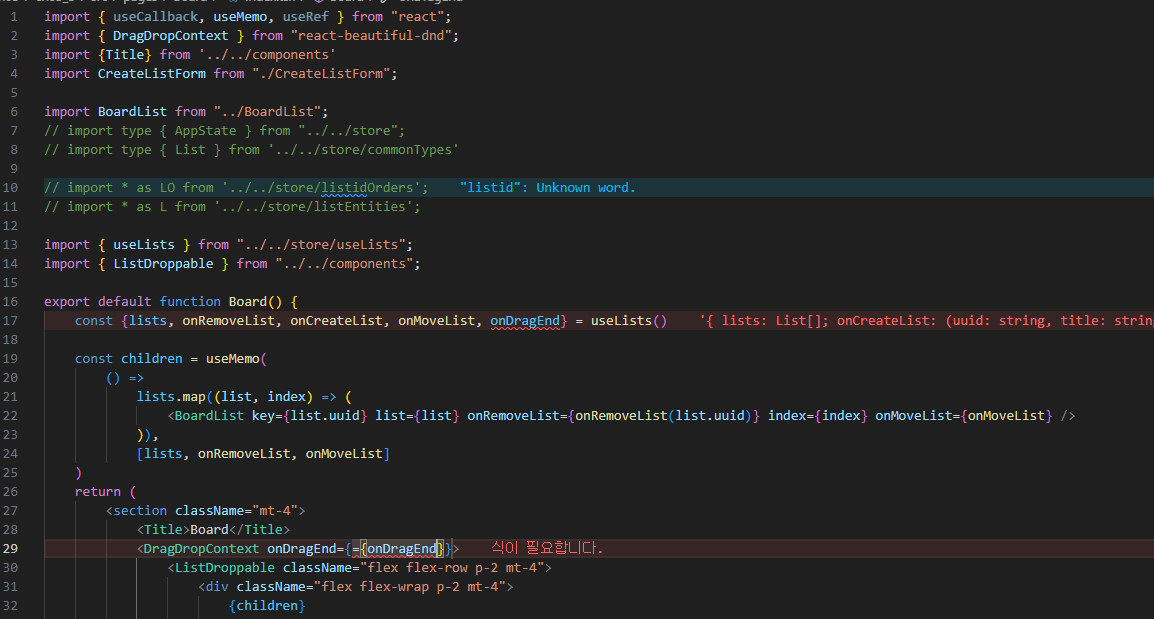
이제 src\pages\Board\index.tsx경로에 react-beautiful-dnd 패키지가 동작할수 있도록 DragDropContext 컴포넌트를 추가합니다.
근데 여기서 DragDropContext 가 동작하려면 콜백 함수 onDragEnd속성을 추가시켜줘야합니다.
이부분은 useLists훅을 수정시켜주면되겠습니다.
CardDraggable 컴포넌트 구현하기
react-beautiful-dnd패키지는 Draggable컴포넌트를 제공합니다.
import {Draggable} from 'react-beautiful-dnd'
그런데 이컴포넌트는 사용방법이 독특합니다. 한번 보겠습니다.
src\components\CardDraggable.tsx
import type { FC, PropsWithChildren } from "react";
import { Draggable } from "react-beautiful-dnd";

export type CardDraggableProps = {
    draggableId: string
    index: number
}

export const CardDraggable: FC<PropsWithChildren<CardDraggableProps>> = ({
    draggableId,
    index,
    children
}) => {
    return (
        <Draggable draggableId={draggableId} index={index}>
            {provided => {
                return(
                    <div
                        ref={provided.innerRef}  // 드래그 가능한 요소의 참조 . 이 참조는 드래그 앤 드롭 라이브러리가 요소의 위치를 추적하는 데 필요합니다.
                        {...provided.draggableProps} // 드래그 가능한 요소에 필요한 속성 이 속성들은 드래그 기능을 활성화하는 데 사용됩니다.
                        {...provided.dragHandleProps} // 드래그 핸들에 필요한 속성 사용자가 드래그를 시작할 수 있는 영역을 정의합니다.
                    >
                        {children}
                    </div>
                )
            }}
        </Draggable>
    )
}
이 코드를 이제 src\pages\ListCard\index.tsx 여기에 적용시켜보겠습니다.
import type {FC} from 'react'
import type {ICard} from '../../data'
import { CardDraggable } from '../../components'
import {Div, Avatar} from '../../components'
import {Icon} from '../../theme/daisyui'

export type UserCardProps = {
  card: ICard
  onRemove?: () => void
  onClick?: () => void
  draggableId: string
  index: number
}

const ListCard: FC<UserCardProps> = ({card, onRemove, onClick, draggableId, index}) => {
  const {image, writer} = card
  const {avatar, name, jobTitle} = writer

  return (
    <CardDraggable draggableId={draggableId} index={index}>
      <Div className="m-2 border shadow-lg rounded-xl" width="10rem" onClick={onClick}>
        <Div src={image} className="relative h-20">
          <Icon
            name="remove"
            className="absolute right-1 top-1 btn-primary btn-xs"
            onClick={onRemove}
          />
        </Div>
        <Div className="flex flex-col p-2">
          <Div minHeight="4rem" height="4rem" maxHeight="4rem">
            <Div className="flex flex-row items-center">
              <Avatar src={avatar} size="2rem" />
              <Div className="ml-2">
                <p className="text-xs font-bold">{name}</p>
                <p className="text-xs text-gray-500">{jobTitle}</p>
              </Div>
            </Div>
          </Div>
        </Div>
      </Div>
    </CardDraggable>
  )
}

export default ListCard
CardDroppable 컴포넌트 구현하기
react-beautiful-dnd패키지는 Droppable컴포넌트를 제공합니다.
import {Droppable} from 'react-beautiful-dnd'
이것또한 독특하므로 코드작성후에 살펴보겠습니다.
src\components\CardDroppable.tsx
import type { FC, PropsWithChildren } from "react";
import { Droppable } from "react-beautiful-dnd";

export type CardDroppableProps = {
    droppableId: string
}

export const CardDroppable: FC<PropsWithChildren<CardDroppableProps>> =({
    droppableId,
    children
}) => {
    return (
        <Droppable droppableId={droppableId}>
            {provided => (
                <div
                    {...provided.droppableProps}
                    ref={provided.innerRef}
                    className="flex flex-col p-2"
                >
                    {children}
                    {provided.placeholder}
                </div>
            )}
        </Droppable>
    )
}
provided.droppableProps: 이 속성은 드롭 가능한 영역에 필요한 props를 포함하고 있습니다. 이를 div 요소에 spread 연산자(...)를 사용하여 적용함으로써, 드래그 앤 드롭 기능이 제대로 작동하도록 합니다.
provided.innerRef: 이 ref는 Droppable 컴포넌트가 관리하는 DOM 요소에 연결됩니다. React에서는 ref를 사용하여 특정 DOM 요소에 직접 접근할 수 있습니다. provided.innerRef를 div 요소에 설정함으로써, react-beautiful-dnd가 이 요소를 추적할 수 있게 됩니다.
children: children은 CardDroppable 컴포넌트의 자식 요소로, 드롭 가능한 영역 안에 렌더링됩니다. 사용자가 이 영역에 드래그하여 놓을 수 있는 아이템들이 될 것입니다.
provided.placeholder: 이 요소는 드래그 중인 아이템의 자리를 유지하기 위해 필요합니다. 드래그 중인 아이템이 드롭 가능한 영역에 있을 때, 이 placeholder가 그 자리를 차지하여 레이아웃이 깨지지 않도록 합니다.
위에코드를 src\pages\BoardList\index.tsx에 적용시키겠습니다.
import type {FC} from 'react'
import type {List} from '../../store/commonTypes'
import type { MoveFunc } from '../../components'

import {useMemo} from 'react'
import {Div} from '../../components'
import { CardDroppable } from '../../components'
import {Icon} from '../../theme/daisyui'
import { ListDraggable } from '../../components'
import ListCard from '../ListCard'
import {useCards} from '../../store/useCards'

export type BoardListProps = {
  list: List
  onRemoveList?: () => void
  index: number
  onMoveList: MoveFunc
}
const BoardList: FC<BoardListProps> = ({list, onRemoveList, index, onMoveList, ...props}) => {
  const {cards, onPrependCard, onAppendCard, onRemoveCard} = useCards(list.uuid)

  const children = useMemo(
    () =>
      cards.map((card, index) => (
        <ListCard key={card.uuid} card={card} onRemove={onRemoveCard(card.uuid)} draggableId={card.uuid} index={index}/>
      )),
    [cards, onRemoveCard]
  )
  return (
    <ListDraggable id={list.uuid} index={index} onMove={onMoveList}>
      <Div {...props} className="p-2 m-2 border border-gray-300 rounded-lg">
        <div className="flex justify-between mb-2">
          <p className="w-32 text-sm font-bold underline line-clamp-1">{list.title}</p>
        </div>
        <div className="flex justify-between ml-2">
          <Icon name="remove" className="btn-error btn-xs" onClick={onRemoveList} />
          <div className="flex">
            <Icon name="post_add" className="btn-success btn-xs" onClick={onPrependCard} />
            <Icon name="playlist_add" className="ml-2 btn-success btn-xs" onClick={onAppendCard} />
          </div>
        </div>
        <CardDroppable droppableId={list.uuid}>{children}</CardDroppable>
      </Div>
    </ListDraggable>
  )
}

export default BoardList
배열 관련 유틸리티 함수 구현하기
이제 onDragEnd속성에 설정할 콜백 함수를 구현할 차례입니다.
arrayUtil.ts 파일에 3가지의 함수를 구현합니다. 이함수들은 순수 함수 형태로 배열에서 아이템의 순서를 변경하거나 제거, 삽입 하는 기능을 수행합니다.
export const swapItemsInArray = <T>(array: T[], index1: number, index2: number) =>
    array.map((item, index) =>
        index === index1 ? array[index2] : index === index2 ? array[index1] : item
    )

export const removeItemAtIndexInArray = <T>(array: T[], removeIindex: number) =>
    array.filter((notUsed, index) => index !== removeIindex)

export const insertItemAtIndexInArray = <T>(array: T[], insertIndex: number, item: T) => {
    const before = array.filter((item, index) => index < insertIndex)
    const after = array.filter((item, index) => index >= insertIndex)
    return [...before, item, ...after]
}
// 예시
//swapItemsInArray
const arr = [1, 2, 3, 4];
const swapped = swapItemsInArray(arr, 0, 2); // index 0과 index 2의 요소를 교환
console.log(swapped); // [3, 2, 1, 4]
//removeItemAtIndexInArray
const arr = [1, 2, 3, 4];
const removed = removeItemAtIndexInArray(arr, 1); // index 1의 요소(2)를 제거
console.log(removed); // [1, 3, 4]
// insertItemAtIndexInArray
const arr = [1, 2, 3, 4];
const inserted = insertItemAtIndexInArray(arr, 2, 99); // index 2에 99를 삽입
console.log(inserted); // [1, 2, 99, 3, 4]onDragEnd 콜백함수 구현하기
onDragEnd 콜백함수를 구현하려면 먼저 react-beautiful-dnd가 제공하는 DropResult 타입의 실제값을 이해해야 합니다.
만약 useLists.ts파일에 다음 내용을 구현하면 result매개변숫값을 관찰해 볼수있습니다.
const onDragEnd = useCallback(
	(result: DropResult) => {
    	console.log('onDragEnd result', result)
    }, []
)
다음은 같은 목록에서 드래그 앤 드롭으로 카드를 옮겼을 때 result값의 내용입니다. source와 destination이라는 속성에 droppableId값이 있는데 같은 목록에서 가드순서를 바꿨으므로 이 값은 서로 같습니다. 또한 index값은 카드의 순서를 담은 배열의 색인입니다. source의 index가 1이고, destination의 index가 0이므로 두 번째 카드가 첫번재 카드로 이동했음을 확인 할 수 있습니다.
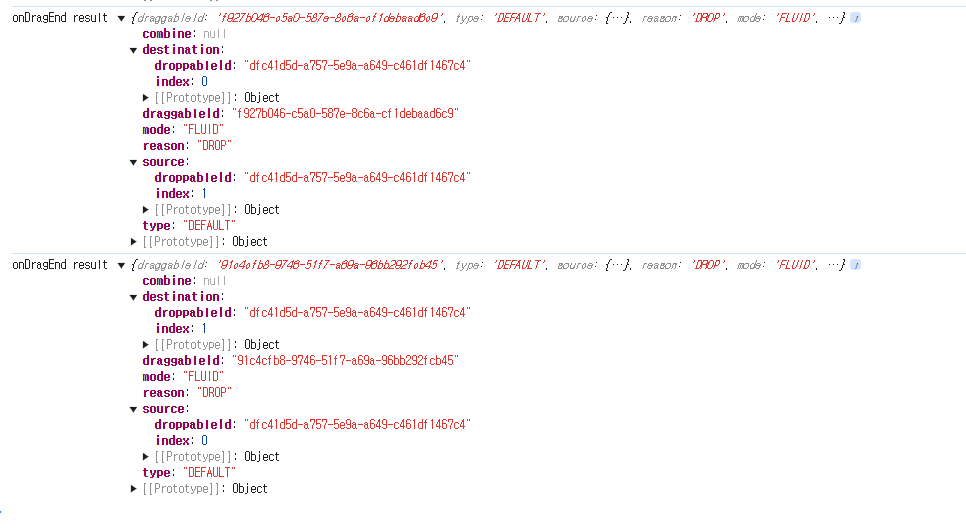
그런데 타입스크립트로 result의 destination 속성은 undefined일 수 있습니다. 타입스크립트에서는 string 타입과 string | undefined 타입은 전혀 다릅니다. 이를 해결하려면 if문으로 undefined일때는 아무런 작업을 하지않게하는 코드가 필요합니다.
const onDragEnd = useCallback(
	(result: DropResult) => {
    	console.log('onDragEnd result', result)
        const destinationListid = result.destination?.droppableId
        const destinationCardIndex = result.destination?.index
        if (destinationListid === undefined || destinationCardIndex === undefined) return
    }, []
)
같은 목록에서 옮길때는 두 색인값 source.draggableId와 destination.draggableId를 교체해 줘야 합니다.
// 같은목록에서 카드옮기기
const sourceListid = result.source.droppableId
const soutcecardIndex = result.source.index

if (destinationListid === sourceListid) {
   const cardidOrders = listidCardidOrders[destinationListid]

   dispatch(
       LC.setListidCardids({
        listid: destinationListid,
        cardids: U.swapItemsInArray(cardidOrders, sourceCardIndex, destinationCardIndex)
       })
   )
}
카드를 다른목록으로 옮길때는 다음처럼 source쪽 listid 부분에서 카드의uuid를 삭제하고, destination쪽 listid부분에 해당index에 카드의 uuid를 추가해줘야합니다.
// 다른목록에서 카드옮기기

const sourceCardidOrders = listidCardidOrders[sourceListid]
dispatch(
	LC.setListidCardids({
    	listid: sourcelistid,
        cardids: U.removeItemAtIndexInArray(sourceCardidOrders, sourceCardIndex)
    })
)

const destinnationCardidOrders = listidCardidOrders[destinationListid]
dispatch(
	LC.setListidCardids({
    	listid: destinationListid,
        cardids: U.insertItemAtIndexInArray(
        	destinationCardidOrders,
            destinationCardIndex,
            result.draggableId
        )
    })
)
다음내용으로 useLists.ts에 onDragEnd콜백함수를 구현해보겠습니다.
import { useCallback } from "react";
import { useDispatch, useSelector } from "react-redux";
import type { AppState } from "../store";
import type { List } from "../store/commonTypes";
import * as LO from '../store/listidOrders'
import * as L from '../store/listEntities';
import * as C from '../store/cardEntities';
import * as LC from '../store/listidCardidOrders';
import { DropResult } from "react-beautiful-dnd";
import * as U from '../untils'

export const useLists = () => {
    const dispatch = useDispatch()

    const lists = useSelector<AppState, List[]>(({listidOrders, listEntities}) =>
        listidOrders.map(uuid => listEntities[uuid])
    )

    const listidCardidOrders = useSelector<AppState, LC.State>(({listidCardidOrders}) => listidCardidOrders)

    const listidOrders = useSelector<AppState, LO.State>(({listidOrders}) => listidOrders)

    const onCreateList = useCallback(
        (uuid: string, title: string) => {
            const list = {uuid, title}
            dispatch(LO.addListidToOrders(uuid))
            dispatch(L.addList(list))
            dispatch(LC.setListidCardids({listid: list.uuid, cardids:[]}))
        },
        [dispatch]
    )
    console.log('listidCardidOrders', listidCardidOrders);

    const onRemoveList = useCallback(
        (listid: string) => () => {
            listidCardidOrders[listid].forEach(cardid => {
                dispatch(C.removeCard(cardid))
            })
            dispatch(LC.removeListid(listid))
            dispatch(L.removeList(listid))
            dispatch(LO.removeListidFromOrders(listid))
        },
        [dispatch, listidCardidOrders]
    )

    const onMoveList = useCallback(
        (dragIndex: number, hoverIndex: number) => {
            const newOrders = listidOrders.map((item, index) =>
                index === dragIndex
                    ? listidOrders[hoverIndex]
                    : index === hoverIndex
                    ? listidOrders[dragIndex]
                    : item
            )
        },
        [dispatch, listidOrders]
    )

    const onDragEnd = useCallback(
        (result: DropResult) => {
            console.log('onDragEnd result', result)
            const destinationListid = result.destination?.droppableId
            const destinationCardIndex = result.destination?.index
            if (destinationListid === undefined || destinationCardIndex === undefined) return

            const sourceListid = result.source.droppableId
            const sourceCardIndex = result.source.index

            if (destinationListid === sourceListid) {
                const cardidOrders = listidCardidOrders[destinationListid]
                console.log('listidCardidOrders', listidCardidOrders);
                console.log('cardidOrders', cardidOrders);

                dispatch(
                    LC.setListidCardids({
                     listid: destinationListid,
                     cardids: U.swapItemsInArray(cardidOrders, sourceCardIndex, destinationCardIndex)
                    })
                )
             } else {
                // 다른목록에서 카드옮기기
                const sourceCardidOrders = listidCardidOrders[sourceListid]
                dispatch(
                    LC.setListidCardids({
                        listid: sourceListid,
                        cardids: U.removeItemAtIndexInArray(sourceCardidOrders, sourceCardIndex)
                    })
                )

                const destinationCardidOrders = listidCardidOrders[destinationListid]
                dispatch(
                    LC.setListidCardids({
                        listid: destinationListid,
                        cardids: U.insertItemAtIndexInArray(
                            destinationCardidOrders,
                            destinationCardIndex,
                            result.draggableId
                        )
                    })
                )
             }

        }, [listidCardidOrders, dispatch]
    )

    return {lists, onCreateList, onRemoveList, onMoveList, onDragEnd}
}